
We’ve been using SendGrid as a service for outgoing email deliverability for quite some time. In late 2016, we implemented the ability to look up the email life cycle for a customer to see if the outgoing email had been processed, delivered, clicked and/or opened.
We have improved the report by adding headers so you know what type of email it is and more information about the content of the email.
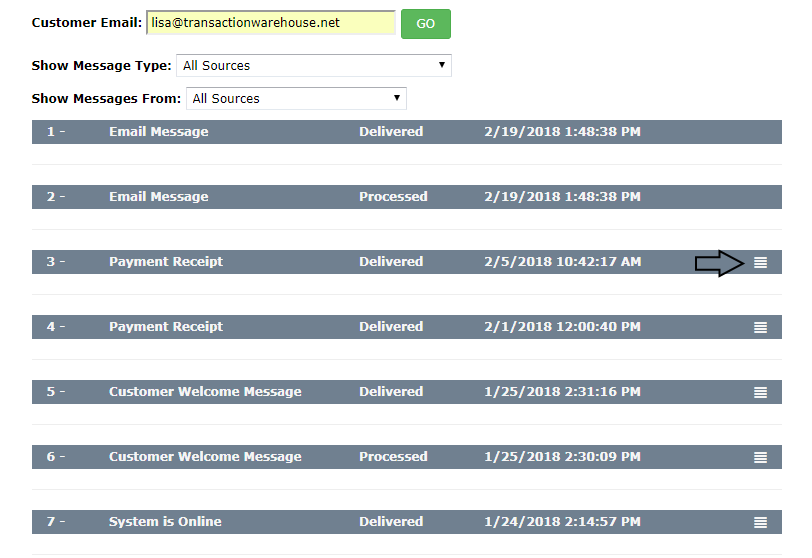
By clicking on the dropdown icon, you can expand the information about the email. For a payment, you will be able to see the account number, the breakdown of payment (bill vs fees) and the Transaction ID. Below that, you will see the event history for the email itself.
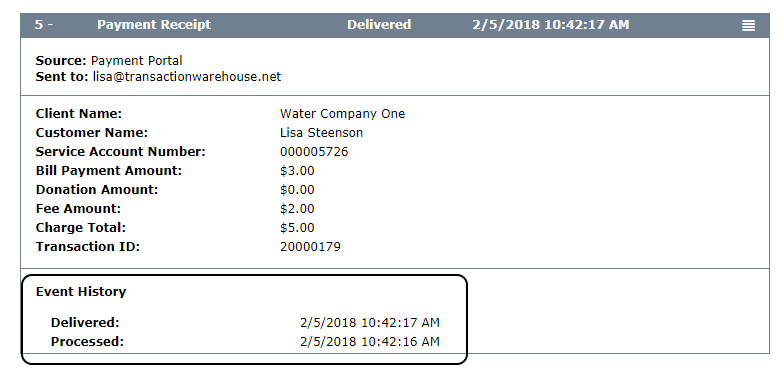
These new details are available for all actions that create an email including:
- Customer Welcome Message
- Profile Changes (BNS, AP, Payment)
- Payment Receipts
- Payment Declined Notifications
- Bill Notifications
- System Offline
We hope that you enjoy this new feature! If you don’t have the SendGrid Email Report available under the Customer Reports area, just let us know. We will need to get you set up with SendGrid and coordinate with the person who controls your email domain to get the process complete.
Comments
0 comments
Article is closed for comments.