
Customer Accounts Report
You will notice that when searching for accounts, we have added icons for the email and SMS participation. This will enable you to see an easy visual of those accounts that are enrolled in email and SMS services along with those that have a saved profile, have made a payment and are enrolled in Automatic Payments:
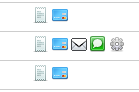
Helpful Hint: When needing to see a list of customers enrolled in services, you can do a search by the most common digit used in your account numbers, such as “0”. This will provide a list of all accounts with online presence.
Customer Detail
When it comes to supporting your customers and helping them through the Online Payment system, many of you have wanted to know when they logged in last or when they enrolled in Automatic Payments. This date will be reflected for those customers that have enrolled after the publish date. Customers enrolled prior to the enhancement will have "Enrolled prior to AP logging feature" on their record.
We have now added that information into the Customer Detail page:
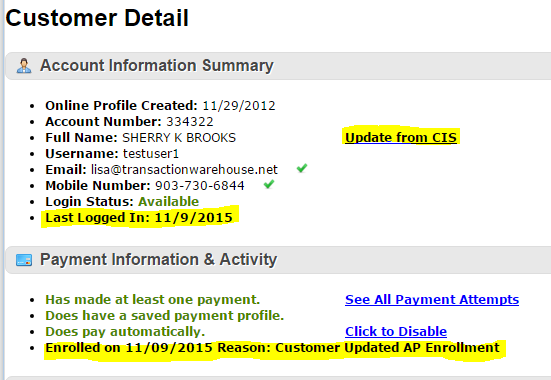
Another feature we added to the Customer Detail report was the ability to update the Customer Name from your billing system (CIS) to the payment system. When you have made a change to the customer record in the CIS, you will notice a link appear on under the Account Information Summary - this allows you to update the name so that it is in sync between the two systems. This impacts the name only.
Comments
0 comments
Article is closed for comments.